A stationary bike workout for seniors that's easy to follow

In short: the easiest stationary bike workout for seniors is one you can follow without squinting or fiddling: text you can make bigger, words read aloud, and a bike that works with or without a sensor. Cyclorama is a free iPhone and iPad app that offers larger text, high contrast and reduced motion, can read its cards aloud, and lets you ride with no sensor at all. Pick an era of history, pedal, and dated moments appear as you ride.
What makes a stationary bike workout for seniors easy to follow
Most indoor cycling apps are built for riders who want to train hard: power numbers, intervals, races. That is fine if you want it. If you want a steady, easy ride at home, the things that matter are simpler:
- You can read the screen from the saddle. A phone on a stand is small, and many of us ride in reading glasses.
- You don't have to read at all if you'd rather not. Audio lets your eyes rest.
- Setup takes a minute, not an evening. No account to make, no special trainer to buy.
- The ride waits for you. Stop for a drink and nothing is lost.
Small text is a real complaint, even in well-loved apps. A Rouvy rider wrote on 3 November 2026: "I find the font to be too small and difficult to read with my readers." A Zwift rider wrote in June 2026 that the font changes in the latest update were "more difficult to read when riding." To be fair to Rouvy, another rider praised that "you can increase the size of the font." (All three are App Store reviews: Rouvy, Zwift.)
Text size, contrast and read-aloud: what to look for in an app
Before you settle on an exercise bike workout for seniors, open the app and check four things:
- Does the text get bigger when you raise the text size in your phone's settings?
- Is there a high-contrast option for a bright room or tired eyes?
- Can it read to you? Narration means you can look up, or close your eyes, and still follow along.
- Can you turn motion down? Busy moving scenery bothers some riders.
What Cyclorama does
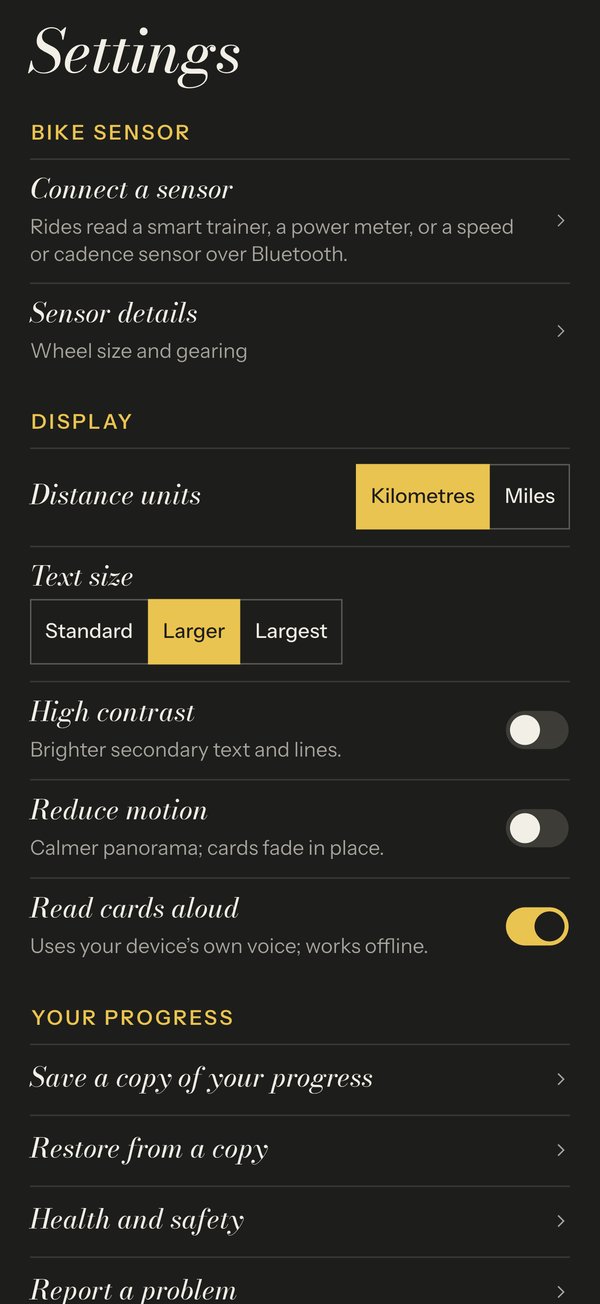
Cyclorama offers larger text, high contrast and reduced motion in Settings. To hear the history instead of reading it, turn on Read cards aloud in Settings, or tap the speaker button on the ride screen. Each card is read as it comes up, in your device's own voice, and it works offline. It's off until you turn it on. The help page has the details. The cards are adapted from Wikipedia (CC BY-SA 4.0), and each one links to its source.
What other apps offer
Zwift publishes an accessibility statement saying it aims to meet WCAG 2.1 Level A and AA, working with the firm Level Access. That is a more formal commitment than Cyclorama makes today. Peloton says its Bike and Bike+ include the TalkBack screen reader, so riders with low vision can hear their metrics during classes, and its app has a beginner cycling section with low-impact and recovery rides led by instructors. If you like an instructor talking you through the ride, Peloton is built for that; Cyclorama is not.
Riding with no sensor (and what estimated distance means)
Many home exercise bikes, upright or a sitting exercise bike for seniors with a backrest, have no Bluetooth at all. That doesn't stop you here. On an era's Choose your ride screen, tap Ride without a sensor, then set Your speed with the slider to the speed you pedal at. Distance is worked out from that speed, and the ride is labelled as estimated. These rides count toward your journey like any other. For more on this, see exercise bike apps that need no Bluetooth.
One thing to know: with no sensor, the app can't tell when you stop pedalling. Set the speed to 0 to pause. With a sensor, the ride pauses by itself when you stop and carries on when you pedal again.
If you'd like measured distance, a basic Bluetooth speed sensor on the rear wheel of a bike on a trainer gives it. A cadence sensor also works, but its distance is an estimate. Cyclorama only reads what your bike sends; it never changes your resistance, so you set the effort with your gears or the bike's own knob. The no smart trainer page has the full table, and the help page covers riding without a sensor. Turning your own bike into a stationary bike shows how to fit one.
A simple first week, by distance (no medical advice)
This is one way to begin, not a training plan. Cyclorama is for riding for fun and fitness. It is not medical advice: check with a doctor before you start a new exercise routine, and stop if anything hurts.
Every era has a Sprint route of about 25 km with the key events, and your place is saved between rides. So a first week can simply be: ride a short, comfortable distance each time, and let the Sprint carry on where you left off. The six eras are outlined in is there a history app for cycling.
- Ride 1: set Today's goal to a short distance, or ride with no goal and stop when you like.
- Rides 2 and 3: the same distance again. Turn on read-aloud and see if it's easier to keep going when you're listening.
- Rides 4 and 5: if the earlier rides felt easy, add a little distance. If not, don't.
A goal only ends today's ride; it doesn't change the journey. If you think in miles, switch with Settings › Distance units › Miles (see units). There's no rush to finish: a long era takes many rides, and finishing gives you a keepsake with the distance, the number of rides and the time it took.
Questions
Are there indoor cycling apps with narration or larger text?
Yes. Cyclorama, a free iPhone and iPad app, offers larger text, high contrast and reduced motion, and can read each history card aloud in your device's own voice. Zwift publishes an accessibility statement aiming at WCAG 2.1 Level A and AA, and the Peloton Bike and Bike+ include the TalkBack screen reader.
Can I use a cycling app on an exercise bike with no Bluetooth?
Yes, with Cyclorama. Choose Ride without a sensor, set the speed you pedal at with a slider, and the ride is labelled as estimated. It still counts toward your journey.
Do I have to look at the screen the whole ride?
No. Turn on Read cards aloud in Settings, or tap the speaker button on the ride screen, and each card is read as it comes up. It works offline and is off until you turn it on.
Can I see miles instead of kilometres?
Yes. Go to Settings › Distance units › Miles. Routes and progress stay the same; only how they're shown changes.
Get Cyclorama
Cyclorama is free on the App Store for iPhone and iPad, with no account and no ads. Android is coming soon: join the beta and we'll invite you.
Download on the App Store Android beta
- Exercise bike app with no Bluetooth: what actually works
- How to turn your own bike into a stationary bike, without a smart trainer
- Turbo trainer apps that work with just a speed or cadence sensor
- Indoor cycling without a smart trainer
- All guides
Image credits
| Credit | Licence | Source |
|---|---|---|
| Illustration, not a photograph: an older rider seen from behind on an upright exercise bike at home, a phone in front of them and a Meiji-era Japanese street at sunset outside. Created for Cyclorama with ChatGPT (AI-generated) | AI-generated by us (ChatGPT) | |
| Cyclorama on iPhone. App Store screenshot, Cyclorama | Own product screenshot, from the App Store listing | source |